iPhone for Beginners Class

I am currently working hard to find a few different locations accross Cape Cod to offer some new classes! These locations will offer a comfortable work space for 4-10 people.

I am excited to announce “iPhone for Beginners” will be at the Cultural Center of Cape Cod in Yarmouth, starting in March. More details to soon!
blog

If you or anyone you know may be interested please contact myself at dan@simplifiedmobility.com or fill out the for below and I will reach out to you!

← Back

Thank you for your response. ✨

Common Password Reset Links

After years of assisting people with their passwords, I have found that it can be very difficult to find the links to reset them.

Below I have compiled a list of different accounts along with the links needed to reset their corresponding passwords. If you need help with your passwords and would like to schedule an appointment for a lesson please email dan@simplifiedmobility.com If there any links you do not see that you would like added please contact support@simplifiedmobility.com


App of the Week: Free Prints

This weeks App of the Week is a great way to get all those awesome pictures you have taken with your phone printed out!!! Today, the camera is one of the most used features of smartphones. Some people share their photos to Facebook, Instagram, or other social media platforms but there are a lot of people who want physical copies.

Free Prints lets you print out 85 4×6 pictures a month for FREE. All you pay is shipping.(usually about $5.00).  My soon to be wife uses this App all the time. The pictures come out great. For a small fee you can even upgrade to a larger size print if you would like. You can access cameras from your Camera Roll, Google Photos, Facebook, Dropbox and more.

This is a great way to get a lot of those pictures off your phone and into picture frames.

If you would like know more or to set up a lesson please contact dan@simplifiedmobility.com or fill out the form at the bottom of the page.


← Back

Thank you for your response. ✨

App of the Week: Reminders

This weeks App comes pre-installed on your iPhone. The Reminders App is a great to keep track of day to day or individual tasks. My favorite thing about Reminders is that it works very well with Siri. Simply say what you want to be reminded of and when and Siri will add it to the Reminders App. For example: “Remind me every Tuesday at 7am to take out the trash.” This will create a weekly reminder for me. See photos for more.

If you would like know more or to set up a lesson please contact dan@simplifiedmobility.com or fill out the form at the bottom of the page.


← Back

Thank you for your response. ✨

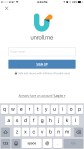
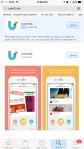
App of the Week: Unroll Me

Last week’s App was all about helping you clean up your Address book by deleting a bunch of contacts you don’t need anymore.

This week is about cleaning up your Email Inbox. Pretty much everyone has this problem. You put your email in somewhere on line and thing you know, you are getting all sorts of emails from the company. You can go through your entire inbox one email at a time and unsubscribe from each one…. Or not.

Download the Unroll Me App and get rid of all of those awful emails taking over your inbox. You can easily unsubscribe from emails that you don’t want to see anymore. “Rollup” subscriptions that you do want to keep getting but don’t want to see all over your inbox. For more or to set up a lesson please contact dan@simplifiedmobility.com


To request a Simplified User Guide or Request a One-on-One Lesson please fill out the brief form below:

← Back

Thank you for your response. ✨

App of the Week: Groups

“Groups” is a great app for managing your Contact list on an iPhone. The free version has some ads that you might have to work around a little bit, but it is worth it!

Usually on an iPhone you have to delete contacts one at a time which can be very time consuming. With Groups, you can select multiple contacts and delete them all at once.

Honestly, I personally would only use this App for deleting multiple contacts at a time.  It offer’s other features like sending text messages and emails but those don’t work nearly as smooth and easy as Apple’s messaging and email apps and I am not giving them any money!
Here are some screenshots from the App! You can see some of the ads I was talking about.

To request a Simplified User Guide or Request a One-on-One Lesson please fill out the brief form below:

← Back

Thank you for your response. ✨

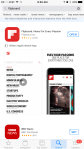
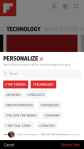
App of the Week: Flipboard

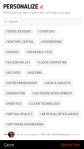
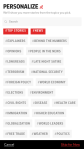
Flipboard is a great App for getting personalized news. The first time you open Flipboard it will have you pick from a list of categories like News, Technology, Sports, Celebrity News, Recipes and more. From there you can dive in even deeper. Set up Flipboard with the type of content that you want to see and nothing else by simply following the prompts. Follow your favorite sports teams or leagues, news about world politics or specific politicians, or watch the stock market and your investments all in one place. See Photos for more.

If you would like know more or to set up a lesson please contact dan@simplifiedmobility.com or fill out the form at the bottom of the page.

← Back

Thank you for your response. ✨

Can You Help???

The more people I work with, the more I  see how much their needs vary. I am reaching out looking for your recommendations. I want to know what you struggle with when it comes to using your phone and other electronics. What do you want to learn about it? Are there any apps you’ve been hearing about but are too intimidated to try? Is there something your phone does that you don’t understand? Tell me what you need and Let me help!!!

Please reach out to me with any suggestions by Email

How to Erase your personal information from an iPhone

Whether you are trading your phone in, selling it privately, or maybe just gifting it to a close friend or family member, it is best to wipe all of your personal information off of the phone. This is a simple explanation of how to do just that!

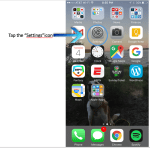
  • Start off by going to the Home screen
  • Tap on the “Settings” icon
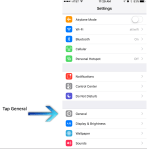
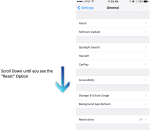
  • Tap where it says “General”
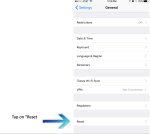
  • Scroll down until you see the option “Reset” and then tap on it.
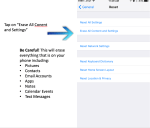
  • Tap “Erase All Content and Settings” to wipe information from phone.
  • If you are signed into iCloud on the phone and/or have a passcode on the phone it will ask you for that information before it erases your content.


Keywords and phrases: reset iPhone, how do I reset my phone? Wipe iPhone, erase phone, factory reset, data wipe