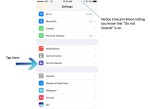
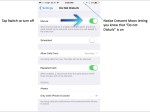
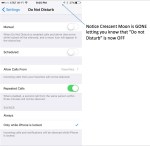
Exciting News! Stay Tuned

I have been hard at work coming up with a lot of new services to educate and improve your life with modern technology. You can do a lot of great things with your phones and other devices.You spend A LOT of money on this stuff and I want to help you get the most out of these products. I want to help make things simple and easy to understand.

Quick Tip: Have a Backup Phone

This is pretty simple. Most people rely on their phones these days. Accidents happen. Make sure you have a back up phone. You want to have something that is somewhat current and familiar. I’ve seen all sorts of people panicked about being able to get in touch with family members and friends. Unless you can get some serious cash for your phone when you upgrade to a new one, I highly recommend saving your old phone if it is still working alright.


Picture instructions to come!

iOS 10 update: Simplified

It’s that time of the year again. Every year, in addition to a new iPhone, Apple releases a new Operating System (OS). People always dread software updates because everyone hates change. Software updates aren’t going anywhere, so its best to try to adapt and make the most of them. Ultimately software updates are designed to improve current functions and add new and exciting features.

Membership provides more detailed information and explanations about the newest software updates!

Key Features

  • Delete ANY app: You can now remove any app from your phone, Apple apps included.
  • No slide to unlock: When the phone is locked push the home button(circle button under screen)to unlock iPhone/iPad instead of sliding from left to right on the screen.
  • Widgets: Now when you slide left to right on the lock screen you get Widgets. Customizable with the apps you use most frequently offering quick access to many functions
  • Enhanced Messaging: iMessage has been enhanced with actions like; Giant emoji’s, laser show backgrounds, flying balloon happy birthdays, and many more.

 

App of the Week: Spotify Music

I’m always coming across people that struggle with managing their music. It’s easy to accidentally lose all your music when you switch phones. It’s also easy to use all up all your data when you’re streaming with internet radio apps like pandora. Spotify allows you to save music to your phone so you don’t have to stream it which drains your data and battery. There is no waiting for buffering because all the music lives on your phone. Playlists can be shared between all of your devices that have the Spotify application. These can include iPhones and iPads, Android phones and tablets like Samsung and LG, as well as windows and apple computers. Ideally all of your music can follow you from device to device without having to do any plugging in or connecting or any other tedious tasks

Quick Tip: Wi-Fi Calling

If you have an iPhone 6 or newer and the service is spotty sometimes, see if your carrier offers Wi-Fi calling. It enables you to call over the Wi-Fi if your cellular service drops below a certain amount. Follow these steps to enable.

Go to

  1. Settings
  2. Phone
  3. Wi-Fi Calling
  4. Tap on toggle switch to enable Wi-Fi Calling